

Page speed optimization is the practice of reducing how long a web page takes to load and become fully usable, directly affecting your search rankings, bounce rates, and revenue. Google measures this through Core Web Vitals, a set of real-user metrics that include Largest Contentful Paint (LCP), Interaction to Next Paint (INP), and Cumulative Layout Shift (CLS). Tools like Google PageSpeed Insights and Lighthouse give you a starting point for diagnosis, but page speed is not a single metric. It reflects a combination of loading, interactivity, and visual stability signals measured across real visitors. If your site is slow, you are losing customers before they ever see your offer.
What is page speed optimization and why does it matter for SEO?
Page speed optimization covers every technique applied from the moment a browser sends a request to the moment a visitor can interact with the page. That includes server response time, image delivery, JavaScript execution, caching, and font loading. Google uses these signals as ranking factors, which means a slow site competes at a disadvantage regardless of how good its content is.
The business case is direct. 53% of mobile visitors abandon a site that takes longer than 3 seconds to load. That is not a marginal loss. For a business generating leads or selling products online, a 3-second load time can cut your potential customer pool in half before a single word is read.

Speed also affects how Google crawls your site. Faster pages get crawled more efficiently, which means new content gets indexed sooner. For local businesses competing in markets like Chicago or Chicagoland, that crawl efficiency translates directly into visibility.
What Core Web Vitals metrics define page speed success?
Google’s Core Web Vitals are the three primary metrics used to evaluate real-world page experience. Each has a defined threshold for what counts as “good.”
- LCP (Largest Contentful Paint): Measures how long it takes for the largest visible element, usually a hero image or headline, to render. The target is under 2.5 seconds.
- INP (Interaction to Next Paint): Measures how quickly the page responds to user input throughout the entire visit. The target is under 200 milliseconds.
- CLS (Cumulative Layout Shift): Measures visual stability. Elements should not jump around as the page loads. The target score is under 0.1.
These three metrics collectively signal whether a page feels fast and stable to real users. Google collects this data from Chrome users and aggregates it in the Chrome User Experience Report (CrUX). Your scores are based on the 75th percentile of real visits, meaning 75% of your visitors must hit the “good” threshold for each metric.
Lab tools like Lighthouse simulate a page load in a controlled environment. They are useful for diagnosing issues, but they do not replace field data. Field data monitoring from real users is the only way to confirm that your changes actually improved the experience for your audience.
Pro Tip: Check your Core Web Vitals field data in Google Search Console under the “Experience” section. This shows your actual scores from real visitors, not a simulated test.
What technical factors most affect page speed?
The factors that slow down a page fall into a predictable set of categories. Addressing them in the right order prevents wasted effort.
- Server response time (TTFB). Time to First Byte is the delay before the browser receives the first byte of data from your server. Slow TTFB directly delays both First Contentful Paint and LCP. CDNs, server-side caching, and optimized database queries are the primary fixes.
- Unoptimized images. Oversized images are the most common cause of slow LCP. Serving images in modern formats like WebP or AVIF, compressing them, and setting explicit width and height attributes reduces both file size and layout shift.
- Render-blocking CSS and JavaScript. Scripts and stylesheets that load before the page renders delay everything the visitor sees. Deferring non-critical JavaScript and inlining critical CSS removes this bottleneck.
- Missing compression and caching. Compression via Gzip or Brotli reduces file transfer size. Browser caching stores static assets locally so repeat visitors load pages faster.
- Third-party scripts. Tag managers, chat widgets, and ad scripts can cause serious performance regressions affecting both INP and LCP by blocking the main thread. Every third-party script you add should be treated like a code deployment, with testing and a rollback plan.
- Layout shift causes. Missing image dimensions and web fonts that load late push content around the page, increasing CLS. Setting explicit dimensions on all media elements and using font-display: swap prevents most layout shift issues.
| Factor | Primary metric affected | Common fix |
|---|---|---|
| Slow TTFB | LCP | CDN, server caching, database optimization |
| Large images | LCP | WebP format, compression, lazy loading |
| Render-blocking scripts | LCP, INP | Defer JS, inline critical CSS |
| No compression | All metrics | Enable Gzip or Brotli |
| Third-party scripts | INP, LCP | Audit and limit external scripts |
| Missing image dimensions | CLS | Set explicit width and height |
Pro Tip: Run a third-party script audit before adding any new widget or tracking pixel. Use Chrome DevTools Performance panel to measure the main-thread impact before and after.
How should you prioritize page speed improvements?
Starting with the wrong fix wastes time. The most effective optimization workflow addresses bottlenecks in order of dependency, so each fix creates the best conditions for the next one.
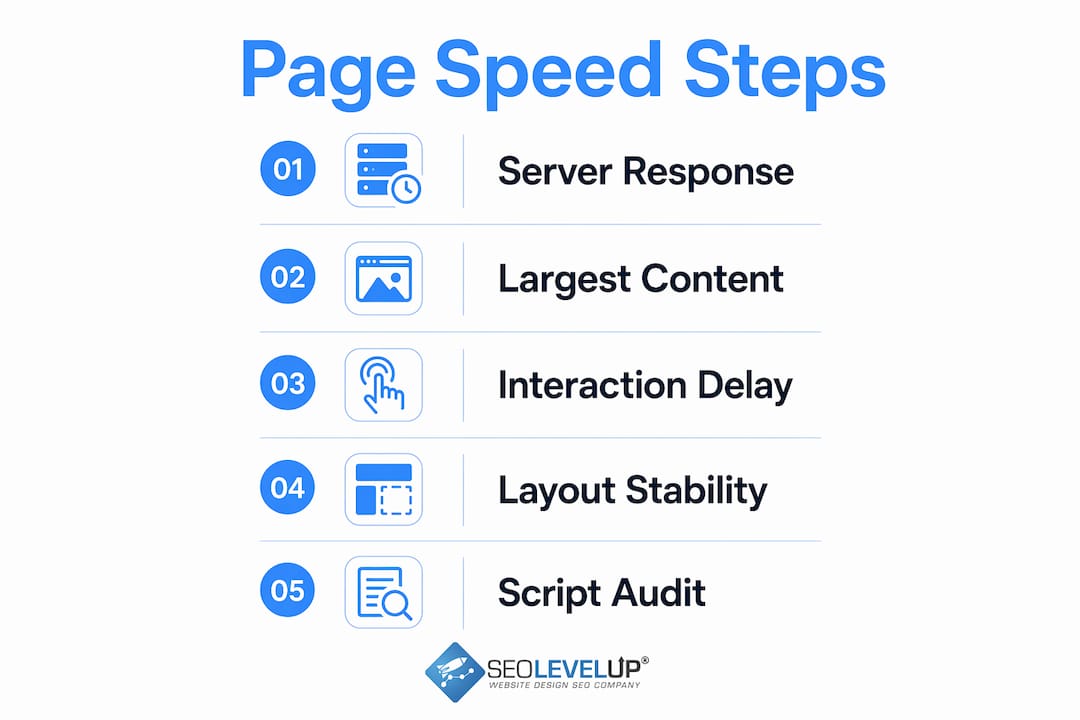
- Audit first. Use Google Search Console and Google PageSpeed Insights to identify your current scores and the specific issues flagged. Do not guess. Let the data tell you where to start.
- Fix TTFB first. Server response time affects every subsequent metric. A slow server makes every other optimization less effective. Address hosting quality, caching, and CDN configuration before touching anything else.
- Improve LCP next. Once the server is fast, focus on the largest visible element. Preload your hero image, compress it, serve it in WebP, and set explicit dimensions. Avoid lazy-loading the LCP image. Lazy-loading the hero image delays its discovery by the browser and worsens LCP even if it reduces overall page weight.
- Optimize INP. Reduce long JavaScript tasks that block the main thread. INP improvements require reducing long tasks across the full page lifecycle, not just the first click. Break up heavy scripts, defer non-critical code, and test interactions throughout the page, not just on load.
- Resolve CLS last. With server, LCP, and INP addressed, fix any remaining layout shift by setting image and video dimensions and using stable font loading strategies.
- Monitor continuously. Speed is not a one-time fix. New features, plugins, and content changes introduce regressions. Set up ongoing field data monitoring through Google Search Console and review Core Web Vitals scores monthly.
Pro Tip: After each round of fixes, wait at least 28 days before evaluating field data changes. CrUX data is a rolling 28-day window, so improvements take time to appear in your scores.
What are the real business benefits of faster page speeds?
Speed improvements produce measurable business outcomes, not just better scores on a diagnostic tool. The connection between load time and revenue is well-documented.
“A 0.1-second improvement in mobile site speed increases conversion rates for retail sites by 8.4% and for travel sites by 10.1%.” — Deloitte, as cited by Google
The benefits extend beyond conversion rate:
- Lower bounce rate. Visitors who wait too long simply leave. Faster pages keep more visitors engaged long enough to convert.
- Higher search rankings. Google uses Core Web Vitals as a ranking signal. Sites that pass all three thresholds gain a competitive edge in search results.
- Better user satisfaction. A fast, stable page builds trust. Visitors associate speed with professionalism and reliability.
- Improved ad performance. Paid traffic sent to a slow landing page wastes your ad budget. Faster pages improve Quality Score in Google Ads, which lowers cost per click.
- Scalability. A well-optimized site handles traffic spikes without degrading performance, which matters during promotions, seasonal surges, or press coverage.
For local businesses, the SEO and user experience connection is especially direct. A competitor with a faster site in the same market will rank higher and convert more of the same traffic you are both targeting.
What tools and practices keep your site fast over time?
Maintaining fast page speeds requires the right tools and consistent habits. A one-time fix is not enough.
- Google PageSpeed Insights: Free, runs both lab and field data analysis, and flags specific issues with recommendations. Start every audit here.
- Google Lighthouse: Built into Chrome DevTools. Runs detailed performance audits in a simulated environment. Useful for diagnosing issues before pushing changes to production.
- Google Search Console Core Web Vitals report: Shows real-user field data segmented by page group. The most reliable source for tracking actual improvements.
- WebPageTest: Provides waterfall charts and detailed timing breakdowns. Useful for identifying exactly which resource is causing a delay.
- Image optimization tools: Tools like Squoosh, ShortPixel, and Cloudinary convert and compress images at scale without manual effort.
Beyond tools, the practices that sustain performance are equally important. Audit every new plugin or script before adding it to your site. Use HTTP/2 or HTTP/3 to parallelize resource loading. Set long cache expiration headers for static assets. Review your website speed optimization setup after every major site update or redesign.
Pro Tip: Assign Core Web Vitals scores as a shared KPI between your SEO team and your development team. When both teams own the metric, regressions get caught and fixed faster.
Speed is the one thing most business owners underestimate
After working with dozens of business websites across Chicagoland, the pattern is consistent. Business owners invest in design, content, and paid ads, then wonder why conversions are flat. The culprit is almost always a slow site that nobody measured until something went wrong.
The mistake I see most often is lazy-loading the hero image. Developers apply lazy-loading site-wide to reduce page weight, which is a reasonable instinct. But the hero image is the LCP element. Lazy-loading it tells the browser to deprioritize the one asset Google is measuring most closely. The page weight drops, the Lighthouse score might even improve in some categories, and the LCP score gets worse. It is a counterintuitive trap that catches even experienced developers.
The second mistake is treating third-party scripts as harmless additions. Every chat widget, heatmap tool, and retargeting pixel you add runs on the main thread. Each one competes with your page content for processing time. I have seen a single poorly-timed tag manager script push a site from passing INP to failing it. Test every script addition the same way you would test a code deployment.
The broader lesson is this: speed optimization is not a project with an end date. It is an ongoing discipline. New content, new features, and new marketing tools all introduce risk. The businesses that maintain fast sites treat performance monitoring the same way they treat security monitoring. It never stops.
View speed as a core competitive advantage, not a technical checkbox. Your competitors are probably not monitoring their Core Web Vitals monthly. That gap is your opportunity.
— Tommy Seilheimer
How SEOLEVELUP builds fast, high-performing websites

SEOLEVELUP, LLC Website Design SEO Company builds custom websites designed to pass Core Web Vitals from day one, not as an afterthought. Every site we build is optimized for TTFB, LCP, INP, and CLS before it launches. We also audit existing sites and fix the specific issues dragging down your scores and your rankings. Our team handles the technical side so you can focus on running your business. Based in Oakbrook Terrace and serving businesses across Chicagoland and nationally, SEOLEVELUP, LLC Website Design SEO Company backs every project with transparent reporting and real performance data. Call (224) 600-4353 for a free SEO audit and find out exactly where your site stands.
FAQ
What is page speed optimization in simple terms?
Page speed optimization is the process of making your web pages load faster and respond more quickly to user actions. It covers everything from server response time to image compression to JavaScript management.
How do Core Web Vitals affect my Google rankings?
Google uses Core Web Vitals, specifically LCP, INP, and CLS, as ranking signals. Sites that hit the “good” threshold for all three metrics gain a ranking advantage over slower competitors in the same search results.
What is a good page load time for SEO?
Google’s LCP threshold defines a good load time as under 2.5 seconds for the largest visible element. Sites that load the main content in under 2.5 seconds are considered to provide a good user experience by Google’s standards.
Why do third-party scripts hurt page speed?
Third-party scripts like chat widgets, ad tags, and analytics tools run on the browser’s main thread. They compete with your page content for processing time, which delays interactivity and can push your INP score above the 200-millisecond threshold.
What free tools can I use to check my page speed?
Google PageSpeed Insights and Google Lighthouse are the two most widely used free tools for page speed analysis. Google Search Console also provides real-user Core Web Vitals field data segmented by page group, which is the most reliable measure of actual performance.
Key takeaways
Page speed optimization requires fixing server response time first, then LCP, then INP, then CLS. Skipping that order wastes effort and produces weaker results.
| Point | Details |
|---|---|
| Core Web Vitals are ranking signals | LCP under 2.5s, INP under 200ms, and CLS under 0.1 are Google’s thresholds for good page experience. |
| TTFB is the first fix | Slow server response delays every other metric, so address hosting and caching before anything else. |
| Field data beats lab scores | Real-user data from Google Search Console confirms whether fixes actually improved visitor experience. |
| Third-party scripts carry risk | Every widget or tracking pixel added to a site can degrade INP and LCP if not tested carefully. |
| Speed drives revenue | Faster mobile pages increase conversion rates, reduce bounce rates, and improve Google Ads Quality Score. |


