

Meta tag optimization is the practice of crafting title tags, meta descriptions, and robots meta directives to improve how your website appears in search results and how search engines understand your pages. Done right, it directly affects your click-through rate, your rankings, and whether Google displays your words or rewrites them entirely. Tools like Google Search Console, Semrush, Yoast SEO, and Screaming Frog make this process measurable and repeatable. This guide covers how to optimize meta tags from the ground up, using Google’s official 2026 guidance and proven best practices for digital marketers and website owners.
What are the key meta tags you must optimize?
Meta tags are HTML elements placed in the <head> section of a webpage. They do not appear on the page itself, but they tell search engines and browsers how to interpret and display your content. Meta tags act as control levers that influence both search engine understanding and SERP display, balancing relevance with user engagement.
Three meta tags carry the most SEO weight:
- Title tag: The clickable blue headline in Google’s search results. It is the single strongest on-page signal for keyword relevance and directly affects your ranking position and CTR.
- Meta description: The short paragraph below your title in the SERP. Google treats it as a pitch to the user. It does not directly influence rankings, but a well-written description drives more clicks.
- Robots meta tag: A page-level directive that tells search engines whether to index a page, follow its links, or display a snippet. This is separate from robots.txt, which controls crawl access at the server level.
The difference between robots.txt and robots meta tags matters more than most marketers realize. Robots.txt blocks crawlers from accessing a URL entirely. Robots meta tags, by contrast, let a page be crawled while controlling what Google does with it after crawling. For example, you can allow Googlebot to crawl a page but use nosnippet to prevent any text from appearing in search results. That level of control is exclusive to HTML meta tags and unavailable through robots.txt alone.
Pro Tip: Use the max-snippet directive on pages where you want Google to show a preview but need to limit how much text appears, such as subscription content or proprietary research.

How to write effective title tags and meta descriptions
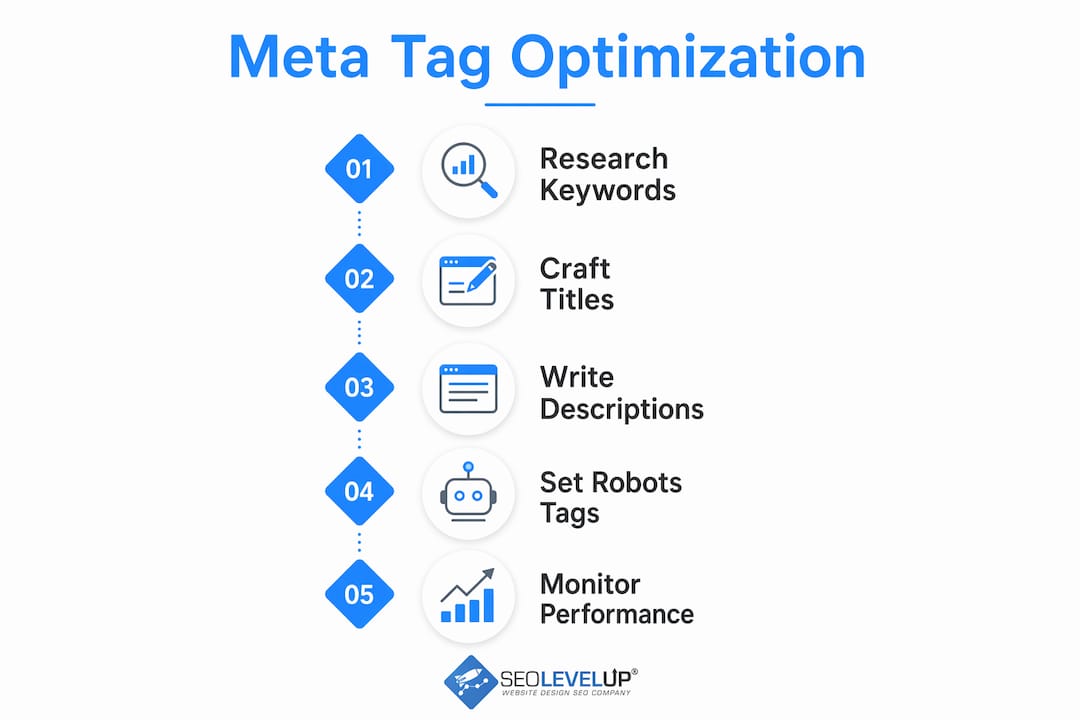
Strong title tags and meta descriptions follow specific technical and editorial rules. Skipping either set leads to truncated titles, Google rewrites, and lost clicks.
Writing title tags that hold up in the SERP
- Measure by pixel width, not character count. Google evaluates titles by pixel width, with a maximum of approximately 575 pixels. That typically translates to 30–65 characters, but wide characters like “W” consume more space than narrow ones like “i.” Use a title tag preview tool such as the one built into Semrush or Yoast SEO to check actual display width before publishing.
- Front-load your primary keyword. Google and users both read left to right. Placing your target keyword in the first 40 characters maximizes relevance signaling and ensures it survives truncation.
- Add your brand at the end. A format like “Target Keyword: Page Topic | Brand Name” works well for most pages. Reserve the front of the title for the user’s query, not your logo.
- Write one unique title per page. Duplicate title tags across multiple pages split relevance signals and confuse Google about which page to rank for a given query.
- Avoid keyword strings. A title like “Chicago SEO Chicago SEO Company Chicago” reads as spam to both Google and users. One clear, descriptive title outperforms any stuffed variant.
Writing meta descriptions that drive clicks
Meta descriptions should be unique, human-readable, and page-specific, with no keyword stuffing and no copy-pasted text across pages. Think of each description as a 150-character sales pitch for that specific page.
| Element | Best Practice | Why It Matters |
|---|---|---|
| Length | 120–158 characters | Prevents truncation on desktop and mobile |
| Keyword placement | Include naturally, once | Signals relevance without stuffing |
| Call to action | “Learn how,” “Get a free quote,” “See pricing” | Increases CTR by setting clear expectations |
| Uniqueness | One per page | Avoids duplicate content signals |
| Content alignment | Match the page’s actual content | Reduces Google rewrites |
Pro Tip: Write your meta description after you finalize the page content, not before. Descriptions written in advance often drift from what the page actually delivers, which triggers Google to rewrite your snippet.
How to use robots meta tags to control indexing and snippets
Robots meta tags give you page-level control that no other SEO tool replicates. Page-level controls unlock granular snippet management that robots.txt simply cannot provide, making them a critical part of any serious SEO governance strategy.
The most commonly used directives include:
noindex: Tells Google not to include this page in search results. Use it on thank-you pages, admin pages, duplicate content, and staging environments.nofollow: Instructs Googlebot not to follow the links on this page. Useful for pages with user-generated content or low-trust outbound links.nosnippet: Prevents snippet display entirely in the SERP. The title still appears, but no description text or rich result is shown.max-snippet:[number]: Limits the snippet to a specific character count. For example,max-snippet:100caps the description at 100 characters.data-nosnippet: An HTML attribute applied to specific sections of a page, not the whole page. Use it to exclude a particular paragraph or table from appearing in any Google-generated snippet.
Here is what a properly structured robots meta tag looks like in HTML:
<meta name="robots" content="noindex, nofollow">
<meta name="robots" content="max-snippet:150">
Aligning your robots meta directives with your SEO strategy is not optional. A page marked noindex by accident, or a key landing page missing its robots tag entirely, can cost you rankings you spent months building. Audit your directives quarterly using Screaming Frog or a Semrush site audit to catch errors before Google does.
Common meta tag mistakes and how to fix them
Most meta tag problems fall into a predictable set of categories. Knowing what to look for cuts your audit time significantly.
- Truncated titles from ignoring pixel width. A title that looks fine at 70 characters may still get cut off in the SERP if it uses wide characters. Always preview in a pixel-width tool, not just a character counter.
- Duplicate meta descriptions. Similar descriptions across pages undermine individual page relevance. Google recommends prioritizing unique descriptions for your highest-value URLs first if you are resource-limited.
- Google rewriting your snippets. When Google replaces your meta description with pulled text from the page, it usually signals a mismatch between your description and your actual content. The fix is to audit the page and rewrite the description to accurately reflect what users will find.
- Keyword stuffing in descriptions. Long keyword strings reduce snippet display probability and make descriptions unreadable. One natural keyword mention per description is the correct approach.
- Missing robots directives on sensitive pages. Pages without explicit robots meta tags default to being indexed and snippeted. If you have pages with pricing details, internal tools, or draft content, add
noindexbefore they surface in search results. - No CTR monitoring workflow. Meta tag optimization is not a one-time task. Monitoring CTR via Google Search Console and testing variations over time is the only way to know whether your tags are actually performing.
Pro Tip: In Google Search Console, filter by “Impressions” to find pages with high visibility but low CTR. Those pages have a meta tag problem, not a ranking problem. Fix the title or description first before touching anything else on the page.
What tools make meta tag optimization faster?
The right tools turn meta tag management from a manual chore into a repeatable system. Here is how the major options compare:
| Tool | Primary Use | Best For |
|---|---|---|
| Google Search Console | CTR and impression data by page | Identifying underperforming tags |
| Semrush Site Audit | Bulk meta tag analysis and error detection | Large sites with many pages |
| Screaming Frog SEO Spider | Crawling and exporting all meta tags | Technical audits and duplicate detection |
| Yoast SEO (WordPress) | In-editor title and description management | WordPress sites with frequent content updates |
| Moz Pro | SERP preview and keyword alignment | Keyword-focused title tag refinement |
Beyond individual tools, a few workflow practices make a real difference:
- Use Screaming Frog to export every title tag and meta description on your site into a spreadsheet. Sort by character count and flag anything under 30 or over 65 characters for review.
- For large sites with thousands of pages, programmatic meta description generation using page-specific data (product name, category, location) prevents duplicate descriptions without requiring manual writing for every URL. Quality assurance checks on generated descriptions are non-negotiable.
- A/B testing meta tag variations through Google Search Console’s performance data gives you real evidence of what drives clicks. Change one element at a time, wait three to four weeks, and compare CTR before and after.
Key takeaways
Effective meta tag optimization requires two parallel workflows: crafting precise, user-focused titles and descriptions, then applying robots meta directives to govern how search engines display your content.
| Point | Details |
|---|---|
| Title tags need pixel-width checks | Use a preview tool to confirm titles display fully at approximately 575 pixels wide. |
| Meta descriptions must match page content | Mismatched descriptions trigger Google rewrites; audit content alignment regularly. |
| Robots meta tags control snippet behavior | Use noindex, nosnippet, and max-snippet to manage what Google shows in the SERP. |
| Duplicate descriptions hurt page relevance | Write unique descriptions for every high-value page; use programmatic generation for scale. |
| CTR data guides ongoing improvements | Monitor Google Search Console monthly and test one tag change at a time. |
The two-layer approach most marketers skip
Most articles about meta tags treat them as a one-time setup task. In practice, I have found that the sites with the strongest organic performance treat meta tag work as two separate, ongoing disciplines.
The first layer is what I call snippet intent. This means writing titles and descriptions that match exactly what the user expects to find when they click. Not what you want them to think the page is about. What the page actually delivers. When those two things align, Google keeps your description. When they do not, Google rewrites it with text pulled from the page body, and that pulled text is rarely as persuasive as a well-crafted description.
The second layer is governance. This is where most marketers fall short. They set up their robots meta tags once and never revisit them. I have audited sites where key landing pages were accidentally marked noindex for months, silently bleeding traffic with no obvious cause. A quarterly crawl with Screaming Frog or Semrush takes less than an hour and catches these errors before they compound.
One more thing worth saying directly: meta descriptions are not guaranteed snippets. Google will replace yours if the page content tells a different story. The solution is not to write a better description in isolation. The solution is to make sure your page content and your description are telling the exact same story. That alignment is what separates sites that keep their snippets from sites that constantly wonder why Google ignores their tags.
If you are working on metadata for local rankings, the same two-layer principle applies, but with location-specific intent woven into every title and description.
— Tommy Seilheimer
Get expert meta tag optimization from SEOLEVELUP
If auditing and rewriting meta tags across your entire site sounds like a project you do not have time for, SEOLEVELUP, LLC Website Design SEO Company handles exactly that. We build custom websites with integrated SEO from the ground up, including title tag strategy, meta description writing, robots directive setup, and ongoing CTR monitoring through Google Search Console. Our team has earned 165+ five-star reviews by delivering verifiable results, not just reports. Whether you need a full technical audit or managed local SEO services that include meta tag governance, we have a solution built for your goals. Call us at (224) 600-4353 for a free SEO audit.
FAQ
What are meta tags in SEO?
Meta tags are HTML elements in a webpage’s <head> section that communicate page information to search engines. The most SEO-relevant meta tags are the title tag, meta description, and robots meta tag.
Why should you optimize meta tags?
Optimized meta tags improve your click-through rate from search results and help search engines correctly index and display your pages. Poor meta tags lead to truncated titles, Google rewrites, and missed traffic.
How long should a meta description be?
Meta descriptions should be 120–158 characters. Longer descriptions get truncated in the SERP, and Google recommends unique, accurate descriptions for each page to maximize snippet retention.
What is the difference between robots.txt and robots meta tags?
Robots.txt controls whether search engine crawlers can access a URL at all. Robots meta tags control what Google does with a page after crawling it, including whether to index it or display a snippet.
Can google ignore your meta description?
Yes. Google may rewrite your meta description if the on-page content provides a more accurate representation of the page. Aligning your description with your actual content is the most reliable way to prevent this.


